 Linxol
Linxol 자세히 보기Linxol, in depth
학습 흐름 8단계The study loop, step by step
한 번의 시도가 기록되고, 다음 시도에서 비교되기까지의 과정입니다.From recording one attempt to comparing it against the next.
- 프로젝트 만들기Create a project — 과목이나 시험 범위 단위로 학습을 묶습니다. group your study by subject or exam range.
- 학습 항목 만들기Create a study item — 프로젝트 안에 구체적인 문제나 개념 단위를 추가합니다. add a specific problem or concept inside the project.
- 시도 기록Record an attempt — 같은 학습 항목에 여러 번의 시도를 반복해서 남길 수 있습니다. the same item can hold multiple attempts over time.
- 근거 이미지 최대 4장 첨부Attach up to 4 evidence images — 문제, 풀이, 참고 정답 등을 사진으로 남깁니다. capture the question, your work, or the reference answer as photos.
- 이미지 역할 지정Assign an image role — 각 이미지를 맥락/문제, 학습자 풀이, 참고/정답, 혼합 중 하나로 표시합니다. tag each image as Context/Question, Learner Work, Reference/Answer, or Mixed.
- 결과와 확신도 기록Record result and confidence — 맞음/틀림 등 결과와 스스로의 확신도를 함께 남깁니다. log whether you were right or wrong, and how confident you were.
- 요청 시 AI 피드백Request AI feedback — 필요할 때만 AI 피드백을 요청합니다. 무료 등급은 평생 5회까지 가능합니다. ask for AI feedback only when you want it — free tier includes 5 lifetime analyses.
- 내 피드백으로 저장 후 비교Save as My Feedback, then compare — 도움이 된 피드백을 저장하면, 다음 시도에서 새 피드백·다시 나타남·해결됨·해결 여부 미확인으로 자동 비교됩니다. save what helped, and your next attempt is automatically compared as new feedback, appeared again, resolved, or resolution unclear.
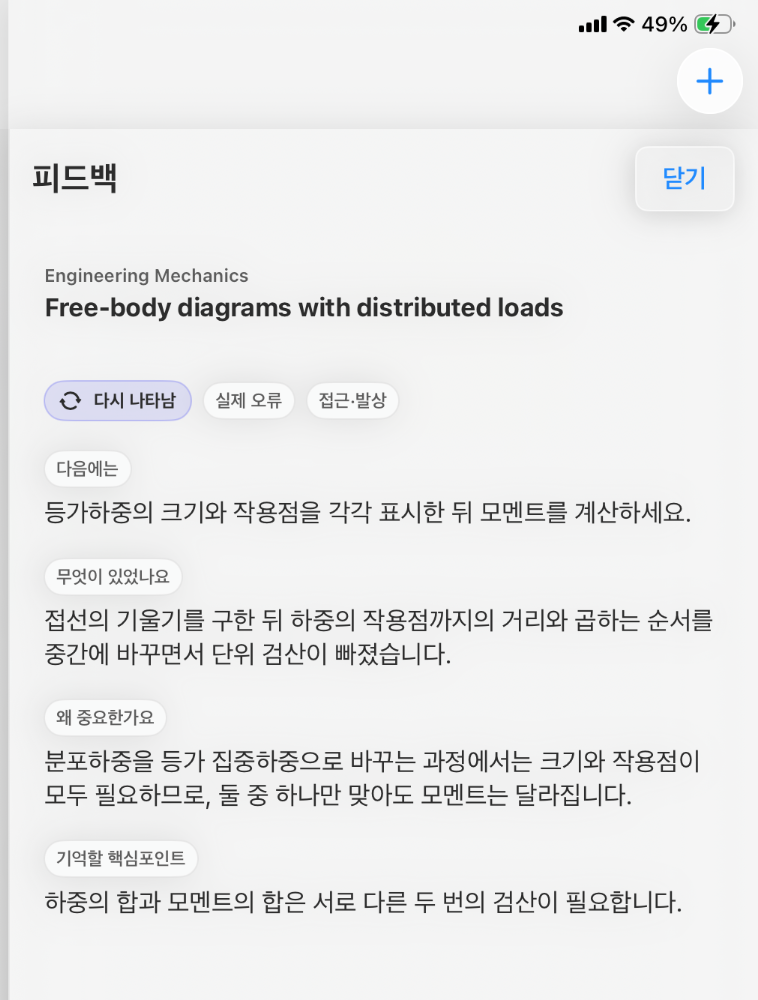
7~8단계에서 저장하는 AI 피드백의 실제 화면 The actual AI feedback saved in steps 7–8
더 자세한 화면별 설명은 사용자 가이드에서 확인할 수 있습니다. For a screen-by-screen walkthrough, see the User Guide.
근거 이미지 역할Evidence image roles
| 역할Role | 설명Description |
|---|---|
| 맥락 / 문제Context / Question | 문제 또는 질문 내용The question or prompt itself |
| 학습자 풀이Learner Work | 이용자가 작성한 풀이나 답안Your own written work or answer |
| 참고 / 정답Reference / Answer | 참고 자료나 공식 정답Reference material or the official answer |
| 혼합Mixed | 위 항목이 함께 포함된 이미지An image containing more than one of the above |
피드백 상태Feedback states
다음 시도를 기록하면 이전 피드백과 자동으로 비교되어 아래 중 하나로 표시됩니다.Your next attempt is automatically compared to saved feedback and marked with one of these.
| 상태State | 의미Meaning |
|---|---|
| 새 피드백New feedback | 이전 피드백 메모리에 없던 새로운 내용Feedback content not present in your prior Feedback Memory |
| 다시 나타남Appeared again | 과거에 저장한 피드백과 유사한 내용이 다시 발견됨Content similar to a previously saved feedback item found again |
| 해결됨Resolved | 이전에 반복되던 문제가 더 이상 나타나지 않음A previously recurring issue no longer appears |
| 해결 여부 미확인Resolution unclear | 해결되었는지 명확히 판단하기 어려움Not clearly determinable whether it has been resolved |
주요 기능Features
프로젝트 · 학습 항목Projects & study items
과목과 문제 단위로 학습을 구조화합니다.Structure your studying by subject and problem.
여러 번의 시도 기록Multiple attempts per item
같은 문제를 반복해서 풀어도 기록이 쌓입니다.Solve the same problem again and again — every attempt is kept.
근거 이미지 최대 4장Up to 4 evidence images
시도마다 문제·풀이·정답 이미지를 첨부합니다.Attach question, work, and answer images per attempt.
결과 · 확신도 기록Result & confidence tracking
정답 여부와 스스로 느낀 확신도를 함께 남깁니다.Log correctness alongside how confident you felt.
무료 로컬 '내 노트'Free local "My Notes"
AI 없이도 무료로 무제한 기록할 수 있습니다.Unlimited note-taking, free, with no AI required.
요청 시 AI 피드백AI feedback on request
필요할 때만 요청하는 방식으로 동작합니다.Runs only when you explicitly ask for it.
피드백 메모리Feedback Memory
도움이 된 피드백을 저장하고 이후 시도와 비교합니다.Save useful feedback and compare it against later attempts.
다음 학습에서 확인할 것Check in your next study session
다음 세션 시작 전 다시 살펴볼 항목을 모아둡니다.Collects what to revisit before your next session starts.
공유 시트로 이미지 가져오기Import images via share sheet
지원되는 노트 앱에서 내보낸 이미지를 가져옵니다.Bring in images exported from supported note apps.
구독 종료 후에도 기록 열람Records stay after canceling
Pro가 끝나도 기존 기록과 피드백은 계속 볼 수 있습니다.Existing records and feedback remain viewable after Pro ends.
Free / Pro 상세 비교Free vs Pro, in detail
| 항목Item | Free | Linxol Pro |
|---|---|---|
| 내 노트My Notes | 무제한Unlimited | 무제한Unlimited |
| 로컬 학습 기록Local study records | 무제한Unlimited | 무제한Unlimited |
| AI 분석AI analyses | 평생 5회5 lifetime | 월별 사용기간당 최대 60회Up to 60 per monthly usage period |
| 가격 (한국 스토어)Price (Korea storefront) | — | ₩14,900 / 월mo · ₩59,000 / 년yr |
| 가격 (미국 스토어)Price (US storefront) | — | $9.99 / mo · $49.99 / yr |
| 구독 종료 후 기존 기록Existing records after canceling | 계속 열람 가능Remain readable | |
위 가격은 참고용이며 실제 결제 금액은 이용자의 App Store 국가/지역 설정에 따라 App Store에 표시되는 가격이 최종 기준입니다. 언어 선택이 결제 국가를 의미하지 않습니다. 구독은 자동으로 갱신될 수 있으며 App Store 설정에서 관리·해지할 수 있습니다. Prices above are for reference only — the amount actually charged follows the price shown by the App Store for your account's country/region. Selecting a display language does not determine your billing country. Subscriptions may renew automatically and can be managed or canceled from App Store settings.
자세한 약관은 이용약관을 확인하세요. See the Terms of Service for full details.
기존 학습 도구와 연결Works alongside your existing tools
Goodnotes, Flexcil 등 지원되는 노트 앱에서 풀이한 페이지를 이미지로 내보낸 뒤, iOS 공유 시트를 통해 Linxol로 가져올 수 있습니다. Export a page you solved in Goodnotes, Flexcil, or another supported note app as an image, then bring it into Linxol via the iOS share sheet.
공식 제휴 관계나 앱 간 자동 동기화 기능은 아니며, iOS 표준 공유 시트를 통한 이미지 가져오기입니다. This is not an official partnership or automatic cross-app sync — it works through the standard iOS share sheet.